


Sprout Network
4.754.00 Reviews
App Specs
- Version
- 1.2.0
- Updated On
- License
- Free
- Downloads
- 100,000+
- Developer
- Growth Chain
- Categories
- Finance
- Platform
- Android
Screenshots
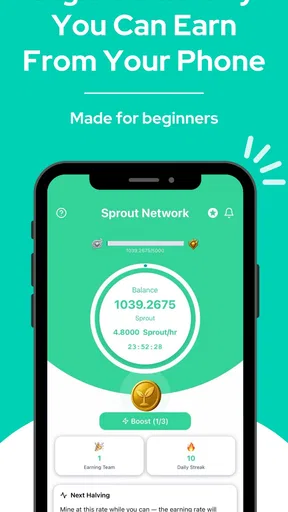
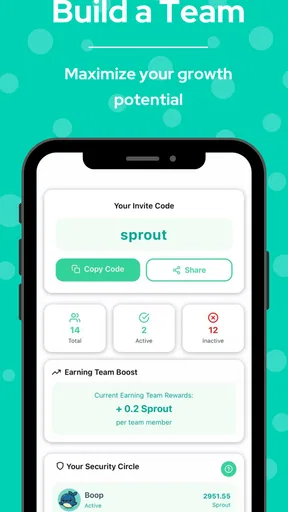

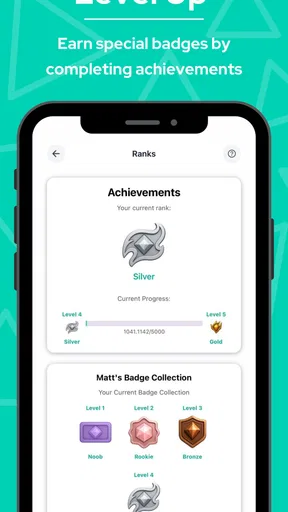
 Analysis by AppCompare
When I decide whether a finance app belongs on my phone, I start with a simple question: does it help me understand or use digital currency in a way that fits my habits? Sprout Network is aimed at people curious about that space, rather than anyone looking for a general-purpose budget or banking tool. Its description is brief, so I’d approach it as a focused digital-currency app and judge it by whether that purpose matches what I want to do.
That distinction matters. A finance app can mean expense tracking, account management, investing, payments, or digital currency, and those jobs are not interchangeable. Before installing, I’d decide whether I want to explore a currency network or keep tabs on everyday spending. If it’s the former, Sprout Network may be worth a look; if it’s the latter, a dedicated budgeting app is likely a better fit.
Choosing a digital-currency app that fits
Sprout Network is a free finance app from Growth Chain, with in-app purchases listed from $4.99 to $24.99 per item. It has a 4.7 average from around 11,000 ratings, and more than 100,000 installs. Those figures suggest that plenty of people have tried it, but they don’t tell me whether it suits a particular user’s needs. I’d treat popularity as a reason to investigate, not as a substitute for understanding the app’s purpose.
The app is rated for Everyone, runs on Android 7.0 or later, and its current version is 1.2.0. It was released on August 20, 2025, so it is a relatively new product. That makes it sensible to take a measured approach: explore what it offers before relying on it for an important financial routine. Free to install is helpful, but the presence of optional purchases is still a reason to check what any paid item provides before spending.
What its focus means in practice
The key decision is whether you’re interested in digital currency itself. If you’re curious about how a currency network fits into your financial life, a purpose-built app can be more relevant than a conventional expense tracker. If your immediate goal is to see where your paycheck went or plan a monthly grocery budget, though, the category mismatch is real. A specialized currency app shouldn’t be expected to replace those tools.
I’d also separate curiosity from commitment. Installing an app to learn its layout is a low-stakes first step; putting money, time, or important records into any finance service deserves more thought. I’d begin by exploring the app’s available screens and settings, then decide whether its actual workflow answers the questions I have. That approach is more useful than assuming that an attractive description or a high average rating proves it is right for me.
Where Sprout Network may make sense
The strongest case for Sprout Network is a user who specifically wants to engage with a digital-currency product and prefers trying an app without an upfront download price. It could also suit someone who wants to keep this interest separate from their everyday spending tools. Keeping those roles distinct can make a personal finance setup easier to understand: one place for household planning, another for exploring digital currency.
Worth Reading Before You Choose

EA SPORTS FC Mobile 26 Is a Bigger Football Game, but It Takes Time

Flipboard Shows What News Apps Must Do Beyond the Feed

Switching to Android Auto Means Rethinking Your Driving Routine

Google Calendar Makes a Crowded Week Easier to Manage

Ludo King Makes the Most of the Minutes Between Plans

Baby Panda World Brings Quick Play to Modern Phones, but Its Game Library Feels Busy
A realistic example would be someone who has a few spare minutes during a commute and wants to check in on a digital-currency app rather than open a spreadsheet or banking app. I’d use that short session to learn the interface and identify which parts are relevant, not to make a rushed financial decision. For anyone new to the category, taking notes on what each screen means can be more valuable than tapping through quickly and later forgetting what they saw.
Another practical use is evaluating whether the app deserves a regular place in your routine. Try it at a consistent moment—perhaps during a weekly review of finances—and ask whether it helps with a specific task. If you can name the task and the app makes it easier, that’s a concrete reason to keep it. If you find yourself opening it without knowing why, that’s a useful signal to pause rather than turn another app into background noise.
How it compares with familiar alternatives
Compared with budgeting apps, Sprout Network has a different apparent center of gravity: digital currency rather than categorizing ordinary spending. A budget-focused app is the more direct choice for tracking bills, setting household limits, or reviewing recurring expenses. Compared with a bank’s own app, a digital-currency product also shouldn’t automatically be treated as a complete view of someone’s finances. I’d choose by task, not by whichever app sounds more modern.
There is a separate trade-off between a dedicated app and a broader financial platform. A focused product may be easier to approach if I only want to explore one area, while a multi-purpose service may be more convenient for someone who wants accounts and routine money management together. Neither arrangement is best for everyone. If switching between tools creates confusion, fewer apps may be preferable; if keeping activities separate helps me stay organized, a specialized app can make sense.
I would not move away from a familiar tool just because Sprout Network is free to install. Switching has a small but real cost: learning another interface, deciding what information belongs there, and remembering to check it. Before making it part of a routine, I’d identify what I expect it to replace—or what new task it will handle. If the answer is vague, the benefit may not justify the extra attention.
How I’d approach a first session
I’d start with the basics: confirm that my device meets the Android 7.0 minimum, install the app, and take time to inspect its navigation before treating it as a daily tool. I’d note any purchase prompts and make sure I understand what is free to use versus what costs extra. Since individual in-app purchases fall within a stated range, I’d avoid buying anything until I could explain to myself what it adds and why I need it.
A useful first-session habit is to make a short list of questions beforehand. For example: Is this the kind of digital-currency experience I was looking for? Can I understand the main actions without guesswork? Does it fit a routine I already have? Those questions keep a quick trial grounded in personal needs instead of vague impressions. They also help distinguish a confusing first encounter from a product that simply isn’t aimed at me.
I’d be cautious about treating a finance app as a source of financial guidance. The fact that an app concerns digital currency doesn’t make it a substitute for understanding risks or making decisions at a pace I’m comfortable with. I’d never let a notification or a brief browsing session become the sole reason for a financial choice. That’s not a judgment about a particular feature; it’s a sensible boundary for using any app in this area.
Who should look elsewhere
If you want a straightforward way to record purchases, plan bills, or monitor a household budget, I’d start with a finance app built around those jobs. If you need a tool for managing a broad set of financial accounts, look for an option specifically designed for that purpose. Sprout Network’s digital-currency focus is a reason to consider it, but also a reason not to expect it to cover every financial need.
It may also be a poor match if you don’t want another account or interface to maintain, or if you prefer to keep financial activity inside an app you already know. New users who are uncomfortable exploring an unfamiliar financial product should take their time and avoid making the app central to a routine before they understand it. A free download lowers the initial barrier, but it doesn’t remove the need to make a deliberate choice.
On the other hand, someone who is curious about digital currency and willing to assess an app on its actual usefulness may find the free starting point appealing. The 4.7 average and sizable group of ratings offer context, while the 100,000-plus installs show that it has found an audience. I’d still make my decision based on fit: ratings can’t tell me whether an app supports the specific task I have in mind.
So, is it worth trying? I’d say yes if digital currency is the reason you’re searching and you’re prepared to explore carefully before relying on the app. I’d skip it if what you really need is budgeting, banking, or a complete financial organizer. My recommendation is to begin with a clear purpose, review any optional purchases, and keep using it only if it earns a practical place in your routine.
So, what’s the deal with Sprout Network? At its core, it’s a productivity app designed to help you connect, organize, and manage various aspects of your life. Whether you’re a busy professional, a student juggling assignments, or just someone looking to keep track of personal projects, this app has got you covered.
Features That Stand Out
First off, their task management system is a marvel. You can create tasks, set deadlines, and even share them with others. It’s like having a digital to-do list, but with superpowers. The interface is sleek and intuitive, so you won’t feel like you’re navigating through a maze just to get things done.
Another standout feature is the networking capability. You can connect with other users, share resources, and collaborate on projects. It’s perfect for those who thrive on teamwork and need a platform to bring everyone together. Plus, the real-time updates mean you’re always in the loop.
User Experience
If you’re worried about a steep learning curve, fear not. The app is designed with user-friendliness in mind. You get a quick tutorial when you first sign up, and the layout is pretty straightforward. Everything feels where it should be—no unnecessary bells and whistles, just pure productivity goodness.
Notifications are perfectly balanced too. You’ll get reminders without feeling like your phone is nagging you every five minutes. It’s all about maintaining that perfect balance between staying informed and avoiding overwhelm.
Why You Might Love It
One of the biggest reasons I’m hooked on Sprout Network is its versatility. It doesn’t matter if you’re planning a big event or just trying to remember to water your plants; this app adapts to your needs. Plus, the ability to sync across devices ensures you’re never out of touch with your plans.
The community aspect is a major plus. You can join groups based on your interests, whether that’s tech, arts, or even a book club. It’s like having a mini social network that’s focused on productivity and growth.
Final Thoughts
In a world where time is of the essence, having an app like Sprout Network can make all the difference. It’s not just about getting things done; it’s about doing them efficiently and effectively. Whether you’re collaborating with a team or managing personal goals, this app is your go-to tool.
So, if you’re on the lookout for an app that streamlines your life and enhances productivity, give Sprout Network a try. You might just find it’s the missing piece you’ve been searching for.
Pros
- User-friendly interface for easy navigation.
- Wide variety of educational content.
- Regular updates with new features.
- Interactive activities for enhanced learning.
- Parental controls ensure safe usage.
Cons
- Limited offline access to content.
- Occasional ads can be distracting.
- Some features require a subscription.
- Compatibility issues with older devices.
- Requires a stable internet connection.
FAQs for Sprout Network
What is Sprout Network and what features does it offer?
Sprout Network is a social app designed to connect users with similar interests through communities and events. Key features include community creation, event management, customizable profiles, and a messaging system. Users can join existing groups or create their own, making it a versatile platform for networking and collaboration.
Is Sprout Network available for both Android and iOS devices?
Yes, Sprout Network is available on both Android and iOS platforms. Users can download the app from the Google Play Store or Apple App Store, ensuring compatibility with most smartphones and tablets. The app is designed to offer a seamless experience across different operating systems.
Does Sprout Network require a subscription or is it free to use?
Sprout Network offers a free version with basic features, but also includes a premium subscription option for users who want access to additional functionalities. The premium plan may include ad-free browsing, advanced customization options, and priority customer support, enhancing the overall user experience.
How does Sprout Network ensure user privacy and data security?
Sprout Network takes user privacy seriously by implementing robust security measures, including data encryption and regular security audits. Users have control over their privacy settings, allowing them to manage who can view their profiles and personal information. The app complies with relevant data protection regulations to safeguard user data.
Can I use Sprout Network to organize and manage events?
Yes, Sprout Network includes a comprehensive event management tool that allows users to create, organize, and promote events within their communities. The feature supports RSVPs, reminders, and event updates, making it easy for users to coordinate gatherings and engage with their audience effectively.


